Exploring the impact of Altium Auto Route on modern PCB design, this article delves into the automation features that revolutionize the design process. Get ready for an insightful journey filled with tips and comparisons that will enhance your PCB design skills.
In this article, we will cover the key features of Altium Auto Route, strategies for optimization, and a comparison with manual routing methods. Stay tuned for valuable insights!
Introduction to Altium Auto Route in PCB Design
Altium Auto Route is a key feature in modern PCB design that automates the routing of traces on a printed circuit board. This powerful tool significantly streamlines the design process by automatically connecting components and optimizing trace paths.
Significance of Altium Auto Route
Altium Auto Route plays a crucial role in modern PCB design by enhancing efficiency and accuracy. With its automation capabilities, designers can save time and effort that would otherwise be spent manually routing traces. This allows for faster design iterations and quicker time-to-market for electronic products.
Transformation of the Design Process
By leveraging Altium Auto Route, designers can focus more on the critical aspects of PCB layout and functionality, rather than getting bogged down in the intricacies of trace routing. This shift in focus enables designers to explore more innovative design solutions and refine their designs to meet specific requirements.
Impact on Efficiency and Accuracy
The automation features of Altium Auto Route lead to improved efficiency in PCB design, as tasks that were previously time-consuming can now be completed quickly and accurately. This results in fewer errors and a higher level of design precision, ultimately enhancing the overall quality of the PCB layout.
Key Features of Altium Auto Route
Altium Auto Route offers several key features that help streamline the PCB design process, making it more efficient and accurate.
Automated Routing
- Automatically generates trace routing based on design rules and constraints.
- Reduces manual routing time significantly, especially for complex designs with high component density.
- Ensures consistent routing quality throughout the PCB layout.
Interactive Routing
- Allows designers to interactively guide the routing path for critical signals or specific areas of the board.
- Enables real-time feedback on routing adjustments, improving signal integrity and reducing EMI issues.
- Enhances design flexibility while maintaining control over the routing process.
Design Rule Check Integration
- Integrates seamlessly with design rule checks to ensure compliance with electrical and manufacturing constraints.
- Identifies and corrects potential routing violations early in the design phase, preventing costly errors during manufacturing.
- Improves overall design reliability and manufacturability.
Multi-Board Assembly Support
- Facilitates the design of multi-board systems by automating the routing process across interconnected PCBs.
- Maintains signal integrity and consistency across multiple boards, optimizing system performance.
- Reduces development time for complex projects involving multiple PCBs.
Strategies for Optimizing Altium Auto Route

When it comes to maximizing the effectiveness of Altium Auto Route, there are several strategies and best practices that can be employed to ensure smooth PCB design. By setting up and running the Auto Route feature correctly, you can save time and improve the overall quality of your design.
Additionally, knowing how to troubleshoot common issues that may arise while using Auto Route can help prevent any setbacks in the design process.
Best Practices for Setting Up and Running Auto Route
Before running the Auto Route feature, it is essential to ensure that your design is well-organized and all components are placed correctly. Here are some best practices to follow:
- Define the design rules and constraints accurately to guide the Auto Router.
- Group components logically to allow for efficient routing.
- Use the interactive routing feature to create initial connections before running Auto Route.
- Regularly save your progress to avoid losing any work during the routing process.
Troubleshooting Common Issues with Auto Route
Despite following best practices, you may encounter some common issues while using Auto Route. Here are some tips for troubleshooting:
- If the Auto Route is taking too long to complete, consider simplifying the design or adjusting routing constraints.
- Check for design rule violations that may be hindering the routing process.
- Manually route critical connections if the Auto Route is unable to achieve the desired results.
- Review the design schematics to ensure that the connections are correctly defined before running Auto Route.
Comparison with Manual Routing in PCB Design
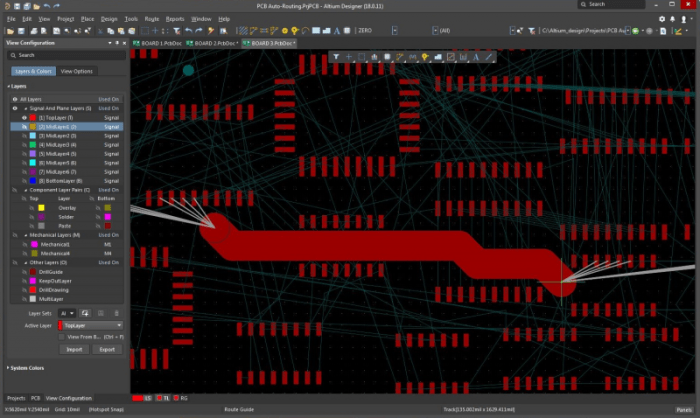
When it comes to designing PCBs, engineers have the option to either use Altium Auto Route or manually route the traces. Both methods have their own advantages and disadvantages, and understanding when to use each approach is crucial for optimizing the design process.Altium Auto Route is a feature that automates the routing process by using algorithms to connect the components on the PCB.
On the other hand, manual routing requires the designer to manually trace the paths for each connection. Let's delve into the comparison between the two methods:
Advantages and Disadvantages
- Altium Auto Route:
- Advantages:
- Speed: Auto Route can quickly route connections, saving time in the design process.
- Consistency: The automated process reduces the chances of human error in routing.
- Complexity: Auto Route can handle complex designs more efficiently than manual routing.
- Disadvantages:
- Limited Control: Designers have less control over the routing paths compared to manual routing.
- Optimization: Auto Route may not always produce the most optimized layout for signal integrity.
- Advantages:
- Manual Routing:
- Advantages:
- Control: Designers have full control over routing paths, allowing for optimized signal integrity.
- Flexibility: Manual routing enables designers to make adjustments based on specific design requirements.
- Disadvantages:
- Time-Consuming: Manual routing can be time-consuming, especially for complex designs.
- Error-Prone: Human error can lead to mistakes in routing paths, affecting the overall performance.
- Advantages:
In conclusion, the choice between using Altium Auto Route and manual routing depends on the specific design requirements and constraints. For simple designs that require quick routing, Altium Auto Route can be a time-saving solution. However, for complex designs that demand optimized signal integrity and specific routing paths, manual routing may be the preferred method.
Understanding the advantages and disadvantages of each approach is essential for determining the most suitable routing method for a given design scenario.
Final Thoughts
In conclusion, Altium Auto Route offers a game-changing approach to PCB design, boosting efficiency and accuracy. By understanding its features and best practices, designers can elevate their projects to new heights. Dive into the world of modern PCB design with Altium Auto Route today!
FAQ
What are the main features of Altium Auto Route?
Altium Auto Route offers features like automated routing, signal integrity checks, and interactive routing options.
How can I maximize the effectiveness of Altium Auto Route?
To optimize Altium Auto Route, ensure proper setup of design rules, use interactive routing for critical signals, and run signal integrity checks regularly.
When should I use Auto Route versus manual routing?
Auto Route is ideal for complex designs with many connections, while manual routing offers more control for specific signal paths. Choose based on your project requirements.